
Numbers
Hadley
Braille for Everyday Use
Workshop 9: Numbers
Opening
Hadley presents Braille for Everyday Use, Workshop 9: Numbers.
Page 1
Congratulations, you’ve learned all of the braille alphabet! Now let's see how we can use the letters a through j to make numbers.
Braille has special symbols called, “indicators.”
An indicator tells us something about the symbol that comes next.
Feel the braille symbol in the top left corner of the page. This is the numeric indicator, dots 3-4-5-6.
It looks like a backward print capital letter L. When the numeric indicator is right before letters a through j, it makes a number.
Below the middle line, you’ll find three rows of numeric indicators.
Place your fingers on the numeric indicator at the beginning of the first row. No need to count, just feel each row of numeric indicators from left to right.
Turn the page.
Page 2
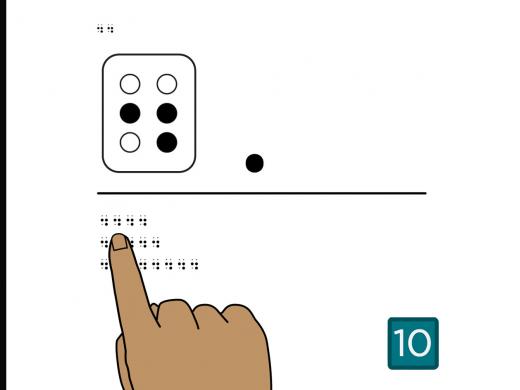
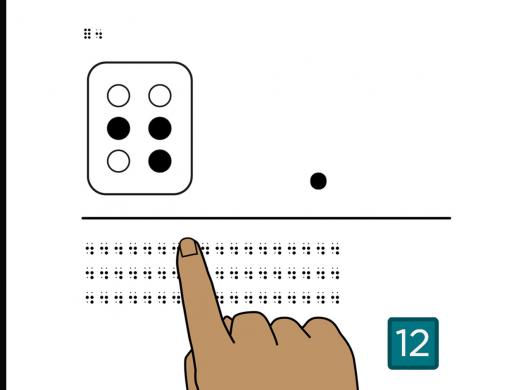
Feel the full cell and numeric indicator in the top left corner of the page.
The numeric indicator is dots 3-4-5-6. It uses the bottom dot on the first side and all three dots on the second side.
Let's practice reading the full braille cell and the numeric indicator.
Below the middle line, you’ll find three rows of braille.
Place your fingers on the numeric indicator at the beginning of the first row.
Count only the number of numeric indicators in the first row.
There are three numeric indicators in the first row.
Now, count only the full braille cells in the second row.
There are five full braille cells in the second row.
And how many numeric indicators are in the third row?
If you found four numeric indicators, you’re right!
Turn the page.
Page 3
Feel the numeric indicator followed by the letter “a” in the top left corner of the page.
When the numeric indicator is placed before the letter a, dot 1, it makes the number “1.”
Notice there is no space between the numeric indicator and the dot 1.
Below the middle line, you’ll find three rows of the number 1.
Place your fingers on the number 1 at the beginning of the first row. No need to count, just feel each row of 1’s from left to right.
Turn the page.
Page 4
Feel the two number 1’s in the top left corner of the page.
Below the middle line are three boxes containing braille.
Scan to find the boxes. Which box contains the number 1?
The 1 is in the middle box!
Turn the page.
Page 5
Feel the numeric indicator followed by the letter “b” in the top left corner of the page.
When the numeric indicator is placed before the letter b, dots 1-2, it makes the number “2.”
Below the middle line, you’ll find three rows of 2’s.
Place your fingers on the number 2 at the beginning of the first row. No need to count, just feel each row of 2’s from left to right.
Turn the page.
Page 6
Feel the two number 2’s in the top left corner of the page.
Now let's read numbers 1 and 2 together in the same row.
Below the middle line, you’ll find three rows of braille numbers.
Place your fingers on the number 2 at the beginning of the first row.
Count only the number of 2’s in the first row.
There are four number 2’s in the first row.
Now count only the number 1’s in the middle row.
Did you find three? That’s correct!
And how many 2’s are in the last row?
There are four.
If you want, you can replay this page as many times as you'd like before moving on. There’s no rush.
When you’re ready, turn the page.
Page 7
Feel the numeric indicator followed by the letter “c” in the top left corner of the page.
When the numeric indicator is placed before the letter c, dots 1-4, it makes the number “3.”
Below the middle line, you’ll find three rows of the number 3.
Place your fingers on the number 3 at the beginning of the first row. No need to count, just feel each row of 3’s from left to right.
Turn the page.
Page 8
Feel the two 3’s in the top left corner of the page.
Below the middle line, you’ll find three rows of braille.
Which row of braille lists the numbers 1 through 3, in order?
Did you choose the first row? If so, you got it!
Turn the page.
Page 9
Feel the numeric indicator followed by the letter “d” in the top left corner of the page.
When the numeric indicator is placed before the letter d, dots 1-4-5, it makes the number “4.”
Below the middle line, you’ll find three rows of the number 4.
Place your fingers on the number 4 at the beginning of the first row. No need to count, just feel each row of 4’s from left to right.
Turn the page.
Page 10
Feel the two 4’s in the top left corner of the page.
Below the middle line are three boxes containing braille.
Scan to find the boxes. Which one contains the number 4?
The last box has the number 4.
Turn the page.
Page 11
Feel the numeric indicator followed by the letter “e” in the top left corner of the page.
When the numeric indicator is placed before the letter e, dots 1-5, it makes the number “5.”
Below the middle line, you’ll find three rows of the number 5.
Place your fingers on the number 5 at the beginning of the first row. No need to count, just feel each row of 5’s from left to right.
Turn the page.
Page 12
Feel the two 5’s in the top left corner of the page.
Below the middle line, you’ll find three rows of braille.
Which row of braille lists the numbers 3 through 5 in order?
Did you choose the middle row? If so, you’re right.
Turn the page.
Page 13
Feel the numeric indicator followed by the letter “f” in the top left corner of the page.
When the numeric indicator is placed before the letter f, dots 1-2-4, it makes the number “6.”
Below the middle line, you’ll find three rows of the number 6.
Place your fingers on the number 6 at the beginning of the first row. No need to count, just feel each row of 6’s from left to right.
Turn the page.
Page 14
Feel the numbers 6 and 4 in the top left corner of the page.
Just like the letters f and d, the 6 and 4 are similar to each other. The 6 is like the print letter F and the 4 is like the uppercase print letter D.
Let's practice reading the numbers 4 and 6.
Below the middle line, you’ll find three rows of braille.
Place your fingers on the number 6 at the beginning of the first row.
Count only the 6’s in the first row.
There are two 6’s in the first row.
Now count only the 4’s in the second row.
If you said three, you got it!
And how many 6’s are in the third row?
There are four.
Turn the page.
Page 15
Feel the numeric indicator followed by the letter “g” in the top left corner of the page.
When the numeric indicator is placed before the letter g, dots 1-2-4-5, it makes the number “7.”
Below the middle line, you’ll find three rows of the number 7.
Place your fingers on the 7 at the beginning of the first row. No need to count, just feel each row of 7’s from left to right.
Turn the page.
Page 16
Feel the two sevens in the top left corner of the page.
Below the middle line are three boxes containing braille. Scan to find the box containing the number 7.
The middle box has the number 7.
Turn the page.
Page 17
Feel the numeric indicator followed by the letter “h” in the top left corner of the page.
When the numeric indicator is placed before the letter h, dots 1-2-5, it makes the number “8.”
Below the middle line, you’ll find three rows of the number 8.
Place your fingers on the number 8 at the beginning of the first row. No need to count, just feel each row of 8’s from left to right.
Turn the page.
Page 18
Feel the two number 8’s in the top left corner of the page.
Below the middle line, you’ll find three rows of braille.
Which row of braille lists the numbers 4 through 8, in order?
Did you choose the last row? Yes! The last row is
4-5-6-7-8.
Feel free to pause and try this one again if you'd like.
When you’re ready, turn the page.
Page 19
Feel the numeric indicator followed by the letter “i” in the top left corner of the page.
When the numeric indicator is placed before the letter i, dots 2-4, it makes the number “9.”
Below the middle line, you’ll find three rows of the number 9.
Place your fingers on the number 9 at the beginning of the first row. No need to count, just feel each row of 9’s from left to right.
Turn the page.
Page 20
Feel the numbers 5 and 9 in the top left corner of the page.
Like the letters e and i, the numbers 5 and 9 are similar. A hint is that the number 5 is lower, and the slope goes down, while the number 9 is higher, and the slope goes up.
Below the middle line, you’ll find three rows of braille.
Place your fingers on the number 9 at the beginning of the first row.
Count only the 9’s in the first row.
There are three 9’s in the first row.
Now count only the 5’s in the middle row.
The middle row has three 5’s.
And how many 9’s are in the last row?
If you found two 9’s, you found them all!
Turn the page.
Page 21
Feel the numeric indicator followed by the letter “j” in the top left corner of the page.
When the numeric indicator is placed before the letter j, dots 2-4-5, it makes the number “0.”
Below the middle line, you’ll find three rows of 0’s.
Place your fingers on the number 0 at the beginning of the first row. No need to count, just feel each row of 0’s from left to right.
Turn the page.
Page 22
Feel the numbers 8 and 0 in the top left corner of the page.
Like the letters h and j, the numbers 8 and 0 are similar. Let’s practice reading the numbers 8 and 0.
Below the middle line, you’ll find three rows of braille.
Place your fingers on the 0 at the beginning of the first row.
Count only the number of 0’s in the first row.
There are three 0’s in the first row.
Now count only the number 8’s in the middle row.
This row has two 8’s.
And how many 0’s are in the last row?
Did you find four 0’s? That’s right!
Turn the page.
Page 23
Feel the numbers 1, 2, and 3 in the top left corner of the page.
In an elevator, the buttons are often labeled with the floor numbers in braille.
Below the middle line, you’ll find three boxes with braille numbers. These boxes represent elevator buttons for a three-story building.
Scan to find the button you’d press to go to the top floor.
If you said the last button, you’re correct. The last button has the number 3.
Which button would you press to go to the first floor?
The first button, with a number 1, would take you to the first floor.
And how about the second floor?
The middle button has a number 2.
Turn the page.
Page 24
Feel the numeric indicator, followed by “a” and “b” in the top left corner of the page. This is the number “12.”
Two-digit numbers, like 12, are made using the numeric indicator only once, followed by two numbers.
Below the middle line are three rows of numbers.
Which row has the number 12?
If you said the middle row, you got it!
How about number 71?
The first row is 71.
Which row is 93?
The last row is 93.
Turn the page.
Page 25
Feel the number in the top left corner of the page. This is the number 45.
Let’s practice reading more two-digit numbers.
Below the middle line, you’ll find four rows of braille numbers.
Find the number 45.
The number in the last row is 45.
What about 54?
It’s in the second row.
And 64?
64 is the first row.
What is the number in the third row?
Did you read the number 69? If so, you’re right!
If this was tricky, feel free to press Replay at the end and try again.
When you’re ready, turn the page.
Page 26
Feel the number 176 in the top left corner.
Three-digit numbers are made using the numeric indicator followed by three symbols. If your street address or apartment number has three digits, you might use a number like this to label your mailbox.
Below the middle line, you’ll find three boxes, arranged from top to bottom, with numbers inside.
Scan to find the box containing the number 176.
The bottom box has the number 176.
Turn the page.
Page 27
Feel the number 350 in the top left corner of the page. You can use numbers to label the temperature dial on your oven, or other appliances.
In the top right corner, find the sticker that says, “350.”
Below the middle line are three boxes containing braille numbers. Scan to find the box you would use to label your oven dial at 350-degrees.
If you said the number 350 is in the middle box, you found it!
If you'd like, you can peel the sticker from the top right corner of the page and place it over the matching number. Or you can use it to label your own oven dial.
And you can learn more about labeling your oven in another Hadley workshop! Reach out to a braille expert, and we'll show you where to find it.
Turn the page.
Page 28
Feel the numbers 7, 8, and 9 in the top left corner of the page.
Below the middle line are three boxes, each with a four-digit number. Scan the boxes to find the number you would use to label a photo album from 1980.
1980 is in the first box!
Turn the page.
Page 29
Feel the numbers 3 and 4 in the top left corner of the page. Now that you know all the numbers, that’ll make taking an elevator so much easier! Each elevator you use might be different, but knowing what buttons to expect will be helpful.
Below the middle line you will find four circles stacked from top to bottom with numbers to the left of them. These circles are like the buttons in an elevator.
Scan to find which floor number is at the top.
If you said, 4, that’s correct.
Did you notice another shape on the bottom row? In elevators, often there are special shapes you can feel to help find the floor you’re looking for. The shape here is a star. A star is often next to the number for the main floor of the building, or the floor you'd use to exit the building.
Which floor is the main floor here?
The first floor is the main floor.
Turn the page.
Page 30
Feel the letters o, c, and a in the top left corner of the page. Sometimes you need to find other buttons—besides the numbers—in an elevator.
Below the middle line, you’ll find three boxes, each containing a word and a special symbol. Scan to find the boxes.
The first two boxes are the “door open” and “door close” buttons.
Which box is “open?”
The first one is “open.” Even though you may not know all the symbols here, you can read the letters o and p, and guess that it’s open. The symbol after the p represents two letters that often appear together. Symbols like this are called “contracted braille,” and you can learn about them in later workshops.
Notice the “door open” and “door close” buttons also have some special symbols below the words. These symbols are arrows. They’re pointing away from each other on the open button and toward each other on the close button.
Now scan to find the last box in the row.
Reading the first two letters of that word, can you guess what that button might be for? A hint is that the raised symbol below the word is a bell.
This is the alarm button. It's good to know how to find the alarm in case of an emergency.
Now you can feel more confident the next time you're in an elevator!
Turn the page.
Page 31
If you'd like to use what you've learned to make different labels, here's some good news. Because you've learned the letters and numbers, you can get a braille labeler from Hadley!
Check out our workshop on the braille labeler in our Producing Braille series and call a braille expert at 847-784-2816 to get one for free! Select next to complete this workshop.
Completion
Congratulations! You know all the letters and numbers in braille.
Braille for Everyday Use: Numbers Series
- Workshop
- Workshop

Explore
-
Vision Loss and Navigating the Aftermath of Natural Disasters
Audio · 35 minutes
-
A family member has vision loss
Resource guide
-
Low Vision Tips at Home: Kitchen
Article · 4 minutes
-
Tech It Out
Discussion
- Explore more
Members also liked
- Video · 6 minutes
- Video · 8 minutes

- Video · 6 minutes
Join the Hadley Community
Hadley's resources are always available to you. Create a no-cost Hadley account to go further:
-
Pick up where you left off Everything you start is automatically saved across Hadley.
-
Personalized recommendations We'll suggest resources based on your interests.
-
Join live discussions Live and lively discussions on technology, cooking, and more, all geared toward the community of people living with vision loss.
-
Find peer support Connect with people who understand what you're going through.