
Numbers: hyphen, colon, dollar
Hadley
Braille for Everyday Use
Workshop 11: Numbers−Hyphen, Colon, Dollar
Opening
Hadley Presents Braille for Everyday Use: Numbers, Workshop 11: Hyphen, Colon, Dollar
Page 1
Let’s learn some more punctuation that we can use with numbers.
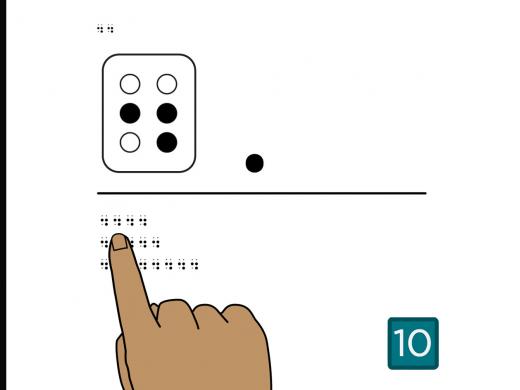
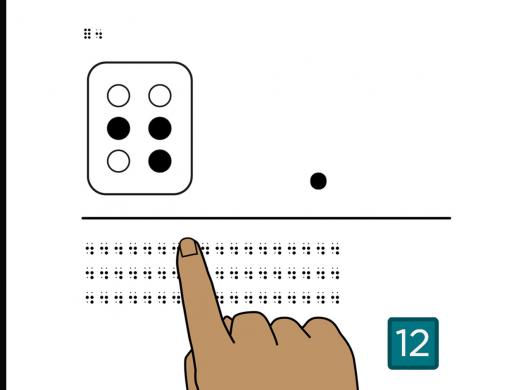
Feel the braille in the top left corner of the page. This is the full braille cell and the hyphen, dots 3-6.
The hyphen uses the bottom dot on the first side and the bottom dot on the second side of the braille cell.
To remember the hyphen, you can think about drawing a line between the two dots. This short line looks like a print hyphen, but it is the bottom two dots of the braille cell, not the middle ones.
Below the middle line, you’ll find three rows of hyphens.
Place your fingers on the hyphen at the beginning of the first row. No need to count, just feel each row of hyphens from left to right.
Turn the page.
Page 2
Feel the two braille hyphens, dots 3-6, in the top left corner of the page.
Below the middle line, you’ll find three rows of hyphens.
Find the hyphen at the beginning of the first row.
From left to right, count the number of hyphens in the first row.
There are six hyphens in this row.
Now, count the number of hyphens in the second row.
If you counted four, you’re right!
And last, count the number of hyphens in the third row.
There are nine hyphens in this row.
Turn the page.
Page 3
Feel the full cell and the hyphen in the top left corner of the page.
Let’s practice reading the full cell and the hyphen. The hyphen is similar to the letter “c,” but it’s in the bottom of the cell.
Below the middle line are two rows of braille, one with full cells and hyphens and one with full cells and c’s.
Which row has the full cell and hyphens?
If you said the second row, that’s correct.
Turn the page.
Page 4
Feel the braille that begins with the numeric indicator in the top left corner of the page.
This is the number one, followed by a hyphen. Notice that it’s written with no spaces.
Below the middle line, you’ll find three rows of braille. Read along as we explore the hyphen with numbers.
On the first row, you’ll find the numeric indicator, 1, hyphen, numeric indicator, 2.
You might read this as 1, 2.
Notice that the numeric indicator is used again after the hyphen. This is different from a decimal point and a comma.
If a number follows the hyphen, the numeric indicator must be brailled again. That way, you can tell the difference between 1-2 and 1-b.
Now read the next two rows.
Which row might show chapters 1 through 7 in a book?
The middle row is 1-7.
If you found this tricky, go ahead and replay the page at the end as many times as you’d like.
Learning how the hyphen is used with numbers is a new skill, and it may take some practice.
When you’re ready, turn the page.
Page 5
Let’s practice using a hyphen with numbers by reading some dates.
In the top left corner of the page, feel the numeric indicator, 1, 2, hyphen, numeric indicator, 3.
This says 12-3, which is the way Americans might write the date December 3rd.
It takes quite a few braille symbols to write a date, especially when you add the year. Once you have more practice, it’ll begin to feel more natural.
Let’s practice reading dates.
Below the middle line, you’ll find three rows of dates in braille.
Find the braille that shows 5-5-2018.
This date is on the second row.
Which row has the date 7-22-29?
Did you find 7-22-29 in the last row?
If you did, you got it!
Now find the braille that shows December 10th, 2020.
The first row says, 12-10-2020.
Turn the page.
Page 6
Feel the braille in the top left corner of the page. This is “800-”. The hyphen is often used for writing phone numbers in braille.
Below the middle line, you’ll find three rows of braille. Imagine that you have phone numbers you want to write down so you can keep them handy. One might be for your veterinarian’s office, another might be for your favorite restaurant, and one more could be for your closest friend.
Find the phone number for your veterinarian. Her number is 800-555-6721. That is, 800-555-6721.
Did you find this number in the last row? If you did, you found the right number.
Now find the phone number for your favorite restaurant. Their number is 312-555-5914. Again, 312-555-5914.
This number is in the second row.
Finally, find the phone number for your closest friend. The number is 669-555-7587. That is 669-555-7587.
The first row has that number.
Turn the page.
Page 7
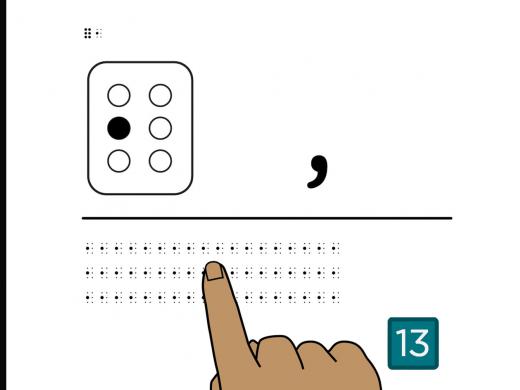
Feel the braille in the top left corner of the page. This is the full braille cell and the colon, dots 2 and 5.
The colon uses the middle dot on the first side and the middle dot on the second side of the braille cell. To remember the colon, think of taking a print colon and turning it on its side.
The colon feels a lot like the “c” or the hyphen, until you feel it next to other symbols.
Below the middle line, you’ll find three rows of colons.
Place your fingers on the colon at the beginning of the first row. No need to count, just feel each row of colons from left to right.
Turn the page.
Page 8
Feel the two braille colons in the top left corner of the page, dots 2 and 5.
Below the middle line, you’ll find three rows of colons.
Find the colon at the beginning of the first row.
From left to right, count the number of colons in the first row.
There are eight colons in the first row.
Now, count the number of colons in the second row.
If you counted five, you’re right!
And last, count the number of colons in the third row.
There are seven colons in this row.
Turn the page.
Page 9
Feel the full cell and the colon in the top left corner of the page. The colon is similar to the c and to the hyphen, but the colon is in the middle of the cell.
Let’s practice reading the full cell and the colon.
Below the middle line are three rows of braille−one with full cells and colons, one with full cells and c’s, and one with full cells and hyphens.
Which row has the full cell and colons?
If you picked the first row, you got it!
Now which row has full cells and c’s.
It’s the last row.
Finally, find the row with the full cells and hyphens.
The second row has full cells and hyphens.
Turn the page.
Page 10
In the top left corner of the page, feel the numeric indicator, 1, colon, numeric indicator, 3, 0.
This is how you write time in braille − it says 1:30.
Notice that there’s a numeric indicator before the number one, and another numeric indicator before the number thirty.
When a number comes after the colon, the numeric indicator must be repeated. That way, you can tell the difference between 1:3 and 1:c.
Below the middle line, you’ll find three rows of braille. Read along as we explore how the colon works when it’s used with numbers.
On the first row, read the numeric indicator, 7, colon, numeric indicator, 3, 0.
This is the time, 7:30.
Did you find the colon?
How about both numeric indicators?
One is at the beginning of the line and the other is right after the colon.
It’s fine if you didn’t read 7:30 the first time. Learning how the colon is used with numbers is a new skill, and it can take some practice.
Now read the second and third rows.
Find 2:45.
The second row says 2:45.
What time is shown in the third row?
Did you read 9:15?
Feel free to replay this page at the end if you’d like to practice it again.
When you’re ready, turn the page.
Page 11
Feel the braille in the top left corner of the page. This is the time 3:45.
Did you notice the colon after the number 3? Using colons with numbers will become more natural as you read more of them.
Below the middle line, you’ll find three rows of braille. Each row of braille has a time of day.
Find the braille that shows the time 8:25.
8:25 is in the last row.
Now find the braille that shows the time 6:10.
The first row says 6:10.
How about 4:55?
Did you find it on the second row?
Turn the page.
Page 12
Feel the braille in the top left corner of the page. This is 9:00.
Below the middle line, you’ll find three rows of braille. Each row has a time of day.
Explore these lines and think about which one is earliest, and which one is latest. Let’s assume these times are all in the morning.
Can you find the earliest time?
The second row is the earliest time. This row says 5:48.
Which one is the latest time?
If you said the last row is the latest time, you got it!
This row says 11:37.
And which time is between these two?
The first row says 9:00.
Turn the page.
Page 13
Feel the braille in the top left corner of the page. This is the dollar sign, dot 4 and “s.”
Notice that the dollar sign takes two braille cells to make. Dot 4 is the first dot on the second side of the cell, and S is the middle and bottom dots on the first side, and the top dot on the second side.
The dollar sign uses the letter s because the print dollar sign looks like the letter s with a line through it.
It may take a while to get used to reading two braille cells at a time to stand for one symbol, and that’s okay. Give yourself time and patience, you’ll get there
Below the middle line, you’ll find three rows of dollar signs.
Place your fingers on the dollar sign at the beginning of the first row. No need to count, just feel each row of dollar signs from left to right.
Turn the page.
Page 14
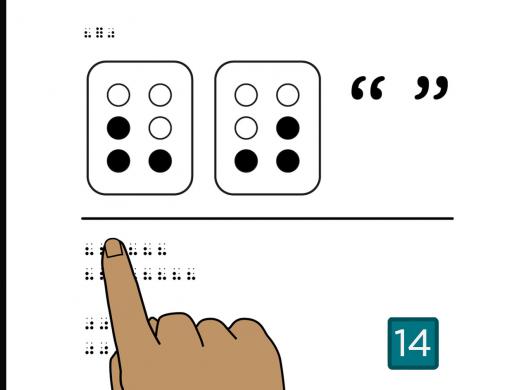
Feel the two braille dollar signs in the top left corner of the page. This two-cell symbol is dot 4, dots 2-3-4. Below the middle line, you’ll find three rows of dollar signs.
Find the dollar sign at the beginning of the first row.
From left to right, count the number of dollar signs in the first row.
There are four dollar signs in the first row.
Now, count the number of dollar signs in the second row.
If you counted six, you found them all!
And last, count the number of dollar signs in the third row.
There are eight dollar signs in this row.
Turn the page.
Page 15
Feel the full cell and the dollar sign in the top left corner of the page.
Let’s practice reading the full braille cell and the dollar sign.
Below the middle line, you’ll find three rows of braille.
Place your fingers on the dollar sign at the beginning of the first row.
Count only the number of dollar signs in the first row.
There are four dollar signs in the first row.
Now count only the full braille cells in the second row.
There are five full braille cells in the second row.
And how many dollar signs are in the third row?
If you found seven dollar signs, you’re right!
Turn the page.
Page 16
Feel the braille in the top left corner of the page. This is the dollar sign, the numeric indicator, 1, 2. It says $12.
Did you notice that the numeric indicator comes right after the dollar sign?
To write a dollar amount in braille, you use the dollar sign, then the numeric indicator, then the number, with no spaces.
Below the middle line, you’ll find three rows of braille with dollar amounts.
Let’s read the first row.
This is the dollar sign, numeric indicator, 8. This says $8.
Now read the next two rows.
Which row says $52?
The last row says $52.
What’s the dollar amount on the second row?
The second row says $37.
Turn the page.
Page 17
Feel the braille in the top left corner of the page. This is $45.
Below the middle line, you’ll find three rows of braille. Let’s find them in order, from lowest to highest amount. Which is the lowest amount?
If you said the middle row, you’re right. The middle row says $30.
How about the highest amount?
The highest amount is in the last row. It says $50.
Now find the amount that’s between $30 and $50.
The first row is the answer. It says $45.
Turn the page.
Page 18
Feel the braille in the top left corner of the page. This is the dollar sign, the numeric indicator, 3, 8, the decimal point, 5, 0.
It says $38.50.
This is how we use the dollar sign and the decimal point to write dollars and cents.
There are no spaces, and just like in other numbers with decimals, you do not use another numeric indicator after the decimal point. That’s because the decimal does not end the effect of the numeric indicator.
Below the middle line, you’ll find four rows of braille. Each row has a dollar amount. Take the time you need to explore each row.
Feel free to pause the audio if you like, then select “Play” when you’re ready.
Now that you’ve explored these dollar amounts, which two rows include cents as part of the amount?
Did you find the two amounts with cents are on the second and last rows? If you did, you found them!
The amount on the second row is $52.81.
And the amount on the last row is $95.25.
Turn the page.
Page 19
Feel the braille in the top left corner of the page. This is $4.89.
Below the middle line, you’ll find three boxes of braille in a row. Check out these boxes to read the prices of different items.
If a box of spaghetti costs $1.29, which box shows the right price?
The last box says $1.29.
What about a package of chicken at $4.89?
If you said the first box, you’re right!
And if a bag of apples is $6.45, which box has this price?
$6.45 is in the middle box.
Turn the page.
Page 20
Feel the hyphen, colon, and dollar sign in the top left corner of the page.
Now that you’ve learned these three symbols on their own, let’s practice reading them all.
Below the middle line are three boxes that have numbers with either a hyphen, a colon, or a dollar sign.
Explore the boxes and read the numbers. If you’d like, press “Pause” to give yourself more time.
Which box shows the time of 7:35?
The middle box shows 7:35.
Now find the box that has the date of 4-5-19.
If you found 4-5-19 in the third box, you got it!
Last, which box has the amount $50?
$50 is in the first box.
Turn the page.
Page 21
Now that you know the dollar sign, colon and hyphen, you can braille your regular monthly expenses or your appointments for the week, or create your own phone list. Have fun finding ways to use these symbols!
And if you are already using a slate and stylus, it can be really handy for writing down phone numbers or appointments.
If you haven’t explored braille writing yet and you’d like to talk about ways to make lists and other handy reminders, you can call a Hadley braille expert at 847-784-2816.
Select Next to complete this workshop.
Completion
Congratulations, you know how to read numbers with the hyphen, colon, and dollar sign, and you’ve completed the Numbers series!
Braille for Everyday Use: Numbers Series
- Workshop

- Workshop
Explore
-
"You tap into other things when you lose some vision"
Audio · 4 minutes
-
I'm having trouble reading
Resource guide
-
Travel with Vision Loss: 11 Tips from Experienced Travelers
Article · 8 minutes
-
Recreation Chat
Discussion
- Explore more
Members also liked
- Video · 6 minutes
- Workshop
Join the Hadley Community
Hadley's resources are always available to you. Create a no-cost Hadley account to go further:
-
Pick up where you left off Everything you start is automatically saved across Hadley.
-
Personalized recommendations We'll suggest resources based on your interests.
-
Join live discussions Live and lively discussions on technology, cooking, and more, all geared toward the community of people living with vision loss.
-
Find peer support Connect with people who understand what you're going through.