
Everyday Braille Writing, Punctuation: Caps, Period, Question, Exclamation
Hadley
Everyday Braille Writing, Punctuation
Workshop 12: Caps, Period, Question, Exclamation
Opening
Hadley presents Everyday Braille Writing, Punctuation, Workshop 12: Caps, Period, Question, Exclamation.
Workbook Page 1: Caps Practice
You've learned to braille the letters and numbers with some punctuation. Now let's learn to write the capital indicator, period, question mark, and exclamation point so you can braille sentences.
We recommend completing Braille for Everyday Use, Punctuation, Workshop 12: Caps, Period, Question, Exclamation before you practice writing these symbols.
Also, you will need your braille workbook for Everyday Braille Writing: Punctuation. If you don't already have one, call Hadley at 847-784-2816 and we'll mail one right out to you.
Just as before, you can use some handy keyboard shortcuts: the spacebar to pause and play, and the right and left arrows to go to the next or previous page. If you use a screenreader, you can find the Pause, Next, and Back buttons by moving through the screen as you would any web page.
Begin by putting paper in the writing device you have available to you, whether the slate and stylus or the Perkins brailler, or you can use an electronic notetaker.
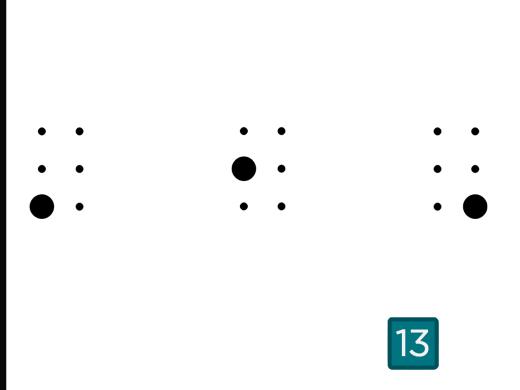
Let's begin with the capital letter indicator. The capital letter indicator is dot 6. It uses the bottom dot on the second side of the cell.
Recall that the capital letter indicator is used to make the next braille symbol a capital letter instead of lowercase. When writing, do not space between the capital letter indicator and the letter that follows it.
Try writing these capitalized words. Leave an empty space or move to the next line for each word. Each item is said twice. To give yourself time to braille, select Pause to write, then select Play to get the next word to write.
First braille: Hadley
Capital H-a-d-l-e-y
Now try: Hello
Capital H-e-l-l-o
Now let's make some phrases using the capital indicator at the beginning and the period at the end. The period is dots 2-5-6. It uses the middle dot on the first side, and the middle and bottom dots on the second side. Throughout the Punctuation writing workshops, use the braille symbol for the punctuation when you hear them.
Braille the phrase: Call me
Capital C-a-l-l, space, m-e, period
Now try: Stop that.
Capital S-t-o-p, space, t-h-a-t, period
When you are ready to check your work, select Next.
Workbook Page 1: Checking Caps Practice
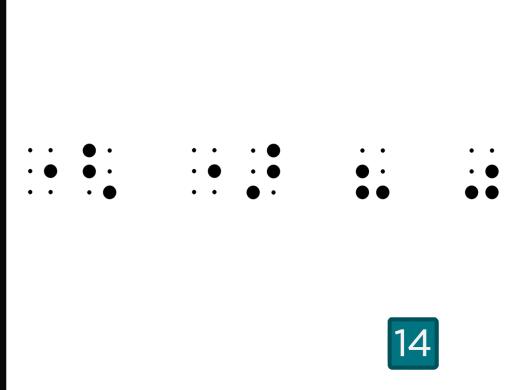
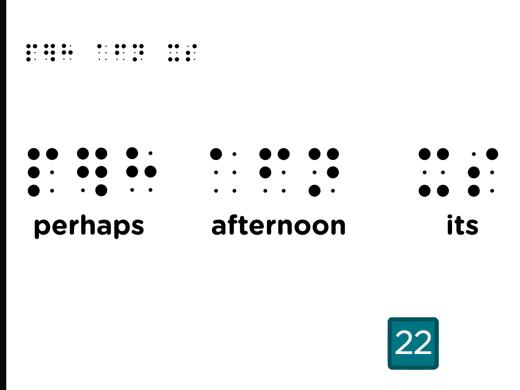
To check your work, turn to page 1 in your workbook. Feel the capital letter indicator, period, and question mark in the top left corner of the page.
Find the line in the middle of the page. Above the middle line, you'll find the four items you just brailled. Read the phrases you wrote and then read them on the workbook page to compare and check your writing.
Is your capital letter indicator the dot 6? It goes right next to the letter you're capitalizing, and check to feel that the period is made with dots 2-5-6 in the lower part of the cell.
Select Next to continue.
Workbook Page 1: Question Practice
Now move down to the next line on your writing device to continue writing.
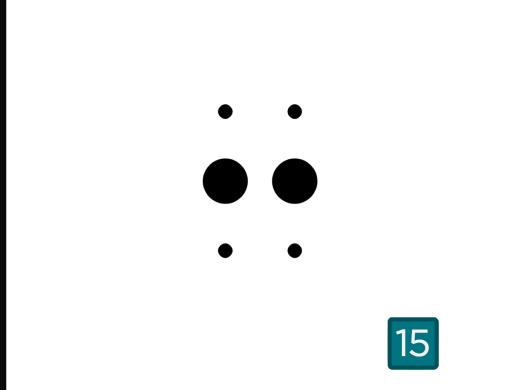
Let's try the question mark. The question mark is dots 2-3-6. It uses the middle and bottom dots on the first side, and the bottom dot on the second side.
Here are five simple questions to write that each end with a question mark. Only the first question is said twice. Just pause the audio for each question so you can write it.
Braille: What?
Capital W-h-a-t, question mark
Recall that these all end with a question mark.
Now braille: Why?
Write: When?
How about: Where?
Finally braille: How?
When you're ready to check your work, select Next.
Workbook Page 1: Checking Questions
Now, go back to the workbook to check your work with the questions written below the middle line on page 1.
Notice how the question mark, just like the period, should be in the lower part of the cell. If you find that you made these symbols incorrectly, just try the phrases again to get them right. And if you have questions or you'd like some help, reach out to a braille expert at Hadley.
When you're ready to write some more, turn to page 2 in your workbook and select Next.
Workbook Page 2: Exclamation Practice
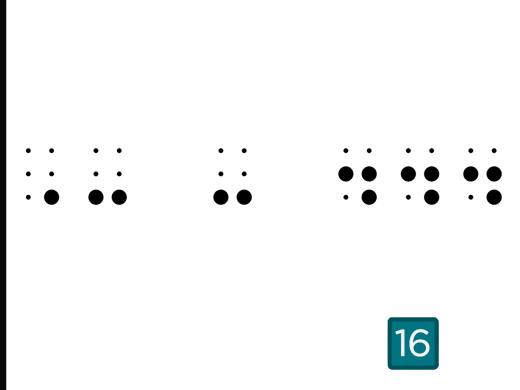
The next punctuation mark is the exclamation point. It is dots 2-3-5 and uses the middle and bottom dots on the first side, and the middle dot on the second side.
Move to the next line on your writing device to write these phrases, each ending with the exclamation point.
Each phrase is said twice. The second time, you'll also hear the punctuation. Pause the audio after each phrase to write it, then play the audio to hear the next phrase.
Write: Halt!
Capital H-a-l-t, exclamation point
Now braille the exclamation: Wow!
Capital Wow, exclamation point
Try: Get Out!
Capital Get, capital Out, exclamation point
Finally write: I love chocolate!
Capital I, love chocolate, exclamation point
When you're ready to check your work, select Next.
Workbook Page 2: Checking Exclamations
Feel the exclamation point in the top left corner of page 2 in your workbook.
Above the middle line are the four phrases like you just brailled. Compare your writing to these.
Did you use the correct dots, 2, 3, and 5, for the exclamation point? Recall that ending punctuation must touch the last word without leaving a space.
Select Next to continue.
Workbook Page 2: Brailling Long Sentences
Back on your writing device, move down to the next line.
Let's start writing some longer sentences using the punctuation symbols you've been practicing. Just like in print, sentences in braille do not always fit on one line. So they will wrap to the next line. To show where a new sentence or paragraph begins and to make it easier to scan a page and find them, each new sentence will now always be indented two cells.
So now, to begin writing, leave two spaces or blank cells and start writing in the third cell. Then when you get to the end of the line move to the next line and continue this sentence in the first cell.
Each sentence is said twice. The second time, you'll also hear the punctuation. Just select Pause to write and then Play when you're ready for the next sentence.
Write this sentence:
I feel like going to a movie.
Capital I, feel like going to a movie, period
Move to the next line. And again, indent two spaces. Now write this question:
Have you heard of any?
Capital Have, you heard of any, question mark
Try this sentence:
I love comedies and action films!
Capital I, love comedies and action films, exclamation point
Now write,
Which style do you prefer?
Capital Which, style do you prefer, question mark
When you're finished, select Next to check your work.
Workbook Page 2: Checking Long Sentences
On page 2 of the workbook, check your sentences with the sentences below the middle line.
Did you indent each sentence two spaces? Look at your third sentence to check if it wrapped to the next line without indentation.
If you have questions about brailing long sentences just reach out to a braille expert. We are happy to help.
Select Next to complete this workshop.
Completion
Congratulations, you've completed Everyday Braille Writing, Punctuation: Caps, Period, Question, Exclamation.
Everyday Braille Writing: Punctuation Series
Explore
-
Choosing and Using a Magnifier
Audio · 21 minutes
-
I'm having trouble reading
Resource guide
-
5 Alexa Skills You'll Use All the Time
Article · 2 minutes
-
What's Cooking?
Discussion
- Explore more
Members also liked
- Workshop
- Workshop
- Workshop
- Workshop
Join the Hadley Community
Hadley's resources are always available to you. Create a no-cost Hadley account to go further:
-
Pick up where you left off Everything you start is automatically saved across Hadley.
-
Personalized recommendations We'll suggest resources based on your interests.
-
Join live discussions Live and lively discussions on technology, cooking, and more, all geared toward the community of people living with vision loss.
-
Find peer support Connect with people who understand what you're going through.