
Punctuation: Caps, Period, Question, Exclamation
Hadley
Braille for Everyday Use: Punctuation
Caps, Period, Question, Exclamation
Note: If using a screen reader, it may be helpful to reread through the activity sentences character by character to check for punctuation.
Opening
Hadley presents Braille for Everyday Use, Punctuation, Workshop 12: Caps, Period, Question, Exclamation.
Page 1
Let’s take a look at capital letters and punctuation in braille so you can start reading full sentences.
Feel the braille at the top left corner of the page.
This is dot 6 followed by a full cell.
Dot 6 is an indicator that tells us the next letter is a capital.
It’s the bottom dot on the second side of the braille cell.
Below the middle line, you’ll find three rows of capital letter indicators.
Place your fingers on the first row of braille.
No need to count. Just feel each row of capital indicators from left to right.
Turn the page.
Page 2
Feel the capital indicator, dot 6, and the full cell in the top left corner of the page.
Below the middle line you’ll find three rows of capital indicators.
Find the capital indicator at the beginning of the first row.
From left to right, count the capital indicators in the first row.
There are four capital indicators in this row.
Now, count the capital indicators in the second row. If you said, “seven,” you’re right!
Finally, count the capital indicators in the last row.
There are six.
Turn the page.
Page 3
Feel the capital letter indicator and the letter “P” in the top left corner of the page.
Notice the P is right next to the capital letter indicator to let us know it’s read as, “capital P.”
Now, let’s look at some words that use a capital letter indicator.
Below the middle line are four names. Go ahead and read the first name.
If you read the name, “Pat,” you’re right!
Now, let’s read the second name.
The second name is, “Lena.”
What name is in the third row?
This one is, “Brett.”
Finally, read the last name.
If you said, “Adrian,” fantastic!
Turn the page.
Page 4
Feel the capital letter indicator, and the letter “A” in the top left corner of the page.
Below the middle line are four phrases using the capital letter indicator.
Let’s read the first row.
Feel free to pause the audio if you need more time.
The first row says, “I go.”
Now, read row two.
If you read, “Luca calls,” you got it!
How about row three?
This one says, “Anna pays.”
And finally, read the last row. This row says, “Juan and Mia.”
Notice each of these names needs a capital indicator.
Turn the page.
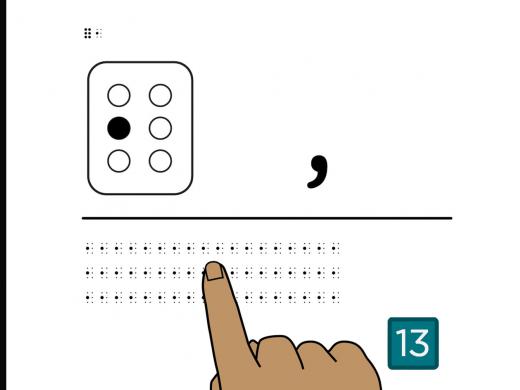
Page 5
Feel the braille in the top left corner of the page.
This is a full cell followed by a period.
The period is dots 2-5 and 6.
The period uses the middle dot on the first side of the cell and the middle and bottom dots on the second side.
To remember the period, which is a print dot, think of it as a dropped braille d for “dot.”
Below the middle line, you’ll find three rows of periods.
Place your fingers on the first row of periods.
No need to count. Just feel each row of periods from left to right.
Turn the page.
Page 6
Feel the full cell and the period in the top left corner of the page.
The period is dots 2-5 and 6.
Below the middle line, you’ll find three rows of periods.
Find the period at the beginning of the first row.
From left to right, count the number of periods.
There are nine periods in the first row.
Now, count the periods in the second row.
There are five.
Next, count the periods in the last row.
If you counted seven, you found them all.
Turn the page.
Page 7
Feel the full cell and the period in the top left corner of the page.
Notice that the period is in the lower part of the cell.
Below the middle line are two rows of braille.
Read the two rows of braille.
Which row contains the word, “wait.” followed by the period?
Did you find it in the first row? That’s right!
Turn the page.
Page 8
Feel the full cell followed by the period in the top left corner of the page.
Let’s read some sentences.
Below the middle line are four sentences.
Each sentence begins with a capital indicator and ends with a period.
Read the first sentence.
Pause the audio if you need more time to read, or replay this slide at the end.
If you read, “Tap any key.” with a period, you got it.
Now let’s read the second sentence.
This one says, “Hi, Sara.” with a period.
Did you notice that both words have a capital letter indicator?
Now read the sentence in the third row.
This one says, “Ravi can go.” with a period.
Finally, read the last sentence. It says, “Take the train.” with a period.
Turn the page.
Page 9
Feel the braille in the top left corner of the page.
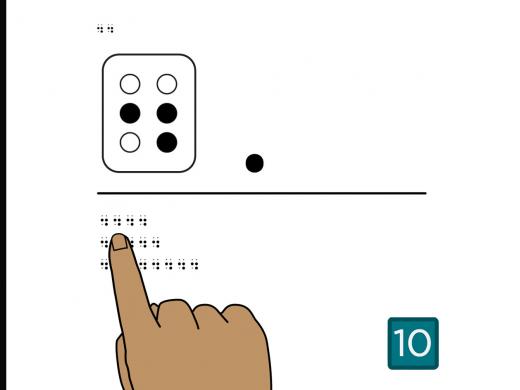
This is the full cell followed by the question mark.
The question mark uses dots 2-3 and 6, the middle and bottom dots on the first side and the bottom dot on the second side of the cell.
A hint to remember the question mark is, it’s like a dropped braille h as in, “huh?”
Let’s practice reading the question mark.
Below the middle line, you’ll find three rows of question marks.
Place your fingers at the beginning of the first row.
No need to count. Just feel each row of question marks from left to right.
Turn the page.
Page 10
Feel the full cell and the question mark, dots 2-3 and 6, in the top left corner of the page.
Below the middle line are three rows of question marks.
Place your fingers at the beginning of the first row.
From left to right, count the number of question marks.
Did you count four? That’s right!
Now, let’s count the question marks in the second row.
There are seven in this row.
Next count the question marks in the last row.
There are 10.
Turn the page.
Page 11
Feel the full cell and the question mark in the top left corner of the page.
Like the period, the question mark is in the bottom part of the cell.
Below the middle line are two rows of braille.
Find the word, “how?” followed by the question mark.
Did you find the question mark in the second row? That’s right.
Turn the page.
Page 12
Feel the full cell and the question mark in the top left corner of the page.
Below the middle line are four sentences ending with question marks.
Go ahead and read the first sentence.
This one says, “Do you play?”
Now, let’s read the second sentence.
If you read, “How do we sign up?”, well done!
What about the third sentence?
This one says, “Is it online?”
Finally, read the last sentence.
It says, “Can we start at 3:00?”
Feel free to replay this page at the end if you’d like to try these again.
Turn the page.
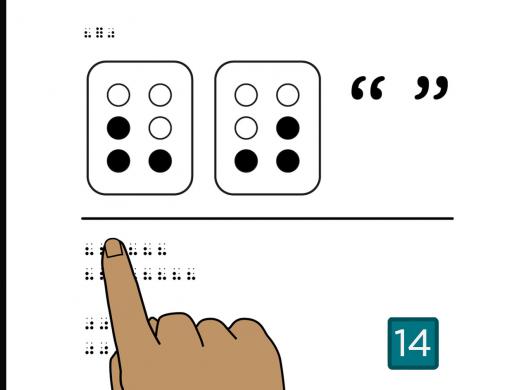
Page 13
Feel the braille in the top left corner of the page.
This is the full cell followed by an exclamation point.
The exclamation point uses dots 2-3 and 5, the middle and bottom dot on the first side and the middle dot on the second side of the cell.
To remember the exclamation point, think of a dropped braille f as in, “fun!”
Let’s practice reading the exclamation point.
Below the middle line you’ll find three rows of exclamation points.
Place your fingers at the beginning of the first row.
No need to count. Just let your fingers feel each row of exclamation points from left to right.
Turn the page.
Page 14
Feel the full cell followed by the exclamation point, dots 2-3-5, in the top left corner of the page.
Below the middle line are three rows of exclamation points.
Place your fingers at the beginning of the first row.
From left to right, count the number of exclamation points.
If you counted eight, you’re right!
Now, let’s count the exclamation points in the second row.
This row has four.
Next, count the exclamation points in the last row.
There are six exclamation points in the last row.
Turn the page.
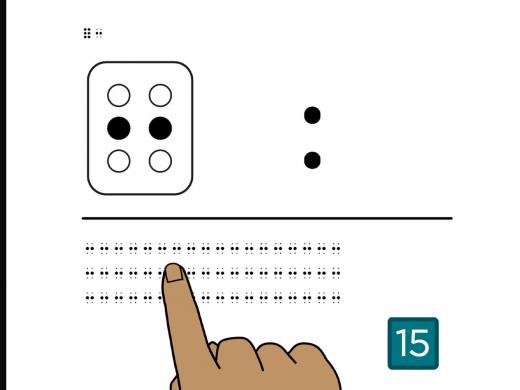
Page 15
Feel the full cell and the exclamation point in the top left corner of the page.
Like the period and the question mark, the exclamation point is in the lower part of the cell.
Below the middle line, you’ll find two rows of braille.
Find the row that says, “Stop!” with an exclamation point.
If you said the first row, you are right.
Turn the page.
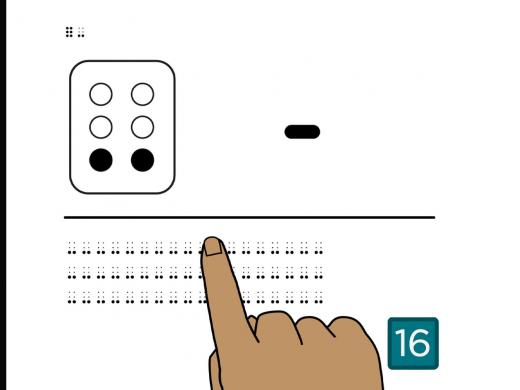
Page 16
Feel the full cell followed by the exclamation point at the top left corner of the page.
Below the middle line are four sentences.
Read the first sentence.
If you read, “You made my day!” with an exclamation point, you got it!
Now let’s read you the second sentence.
This one says, “Tell Dave he won again!” with an exclamation point.
How about the third sentence?
This one says, “Thanks for your help!” with an exclamation point.
Finally, what does the last one say?
It says, “Win one for the team!” with an exclamation point.
When you’re ready, turn the page.
Page 17
Feel the period, question mark, and exclamation point in the top-left corner of the page.
Below the middle line, you’ll find three rows of braille.
Which row contains the word, “Hey.” with a period?
The middle row says, “Hey.”
How about, “Hey?”
This is in the last row.
Now find “Hey!”
Yes, the exclamation point is in the first row.
Turn the page.
Page 18
Feel the period, question mark, and exclamation point in the top left corner of the page.
Have you noticed that there’s no space between the last word and the ending punctuation?
In Braille, punctuation follows the same spacing as in print.
Below the middle line are four sentences. Read only the first two sentences.
Which sentence uses the period correctly?
Remember, you can pause the audio if you need more time.
If you chose the second sentence, you’re right, because the period comes right after the last word, without a space.
The sentence says, “Jana likes to cook and bake.”
Now take a look at the third and fourth sentences. Which sentence is brailled correctly?
If you chose the last one, you got it!
The third sentence is missing the question mark.
The last one asks, “Will Benji swim?”
Turn the page.
Page 19
Feel the number 1. in the top left corner of the page.
Sometimes we use the period in other places besides the end of a sentence, such as after a number in a numbered list.
As you learned earlier, the same symbol, dots 2-5-6, is used for the decimal.
Below the middle line is a numbered list noting the distance to different places.
Read each of the items in the list. Feel free to pause and take your time.
Which item in the list tells you how far it is to the zoo?
The last item mentions the zoo.
How far away is the school?
The first item tells you the school is 1.5 miles away.
Which destination is 3.7 miles away?
If you said, “the mall,” in the second item, you got it!
Turn the page.
Page 20
Feel the period, question mark, and exclamation point in the top-left corner of the page.
Below the middle line, you’ll find four sentences that use several punctuation marks, and some numbers.
Read the first two sentences.
Which sentence says, “End your 8.6-mile run by 4:30!”?
Again, which says “End your 8.6-mile run by 4:30!”?
It’s the first sentence.
Did you notice the differences in the second sentence?
It says “8!6” and has a period at the end.
Next, read the third and last sentences.
Which sentence asks, “Whose birthday is on
8-20-81?”
Again, which says, “Whose birthday is on 8-20-81?”
If you chose the last sentence, you got it!
The third sentence has sixes instead of eights, and an exclamation point instead of a question mark.
If you found this tricky, or you just want to practice some more before moving on, feel free to replay the page as many times as you’d like. There’s no rush.
And if you’d like some extra help, reach out to a braille expert. We’re happy to help.
When you’re ready, turn the page.
Page 21
Feel the period, question mark, and exclamation point in the top left corner of the page.
Below the middle line is a note with four sentences.
Read the note, and notice the ending punctuation for each row.
If you need more time than what is provided, just press pause.
The note says:
“Hi, Mia! How are you? I got a new puppy on 4-15.
Can you visit on 7-25 to meet him? Dale.”
Did you find each of the punctuation marks?
If you’d like to try again, replay this page at the end.
When you’re ready, turn the page.
Page 22
Now that you’ve learned the letters, numbers, and some basic punctuation, you can write your own note to a friend, as well as handy lists and reminders.
If you need help, or you just want to share your work, call a braille expert at Hadley at
847-784-2816.
And since you’re now reading longer braille passages, you may want to check out Hadley’s workshop series on the best ways to move your hands and fingers across the braille to make reading easier.
Select Next to complete this workshop.
Completion
Congratulations! You’ve learned to capitalize letters and use some basic end punctuation.
Braille for Everyday Use: Punctuation Series
- Workshop
- Workshop
Explore
-
Painting Blind
Audio · 27 minutes
-
I'm struggling to read. Now What?
Resource guide
-
Practical Tips for Living with Vision Loss After a Stroke
Article · 7 minutes
-
Writers' Circle
Discussion
- Explore more
Members also liked
- Workshop

- Workshop
- Workshop

- Video · 6 minutes
Join the Hadley Community
Hadley's resources are always available to you. Create a no-cost Hadley account to go further:
-
Pick up where you left off Everything you start is automatically saved across Hadley.
-
Personalized recommendations We'll suggest resources based on your interests.
-
Join live discussions Live and lively discussions on technology, cooking, and more, all geared toward the community of people living with vision loss.
-
Find peer support Connect with people who understand what you're going through.