
Punctuation: Comma, Apostrophe, More Caps
Hadley
Braille for Everyday Use: Punctuation
Comma, Apostrophe, More Caps
Note: If using a screen reader, it may be helpful to reread through the activity sentences character by character to check for punctuation.
Opening
Hadley presents, Braille for Everyday Use, Punctuation, Workshop 13: Comma, Apostrophe, More Caps.
Page 1
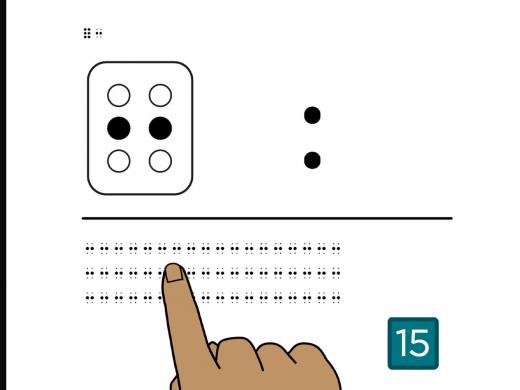
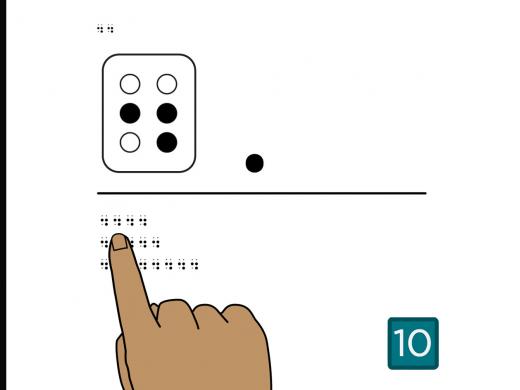
Feel the braille in the top left corner of the page.
This is the full cell followed by the comma.
The comma is dot 2, the middle dot on the first side.
The comma is used right after the last letter of a word with no space.
Below the middle line, you’ll find three rows of commas.
Place your fingers on the comma at the beginning of the first row.
No need to count. Just feel each row of commas from left to right.
Turn the page.
Page 2
Feel the full cell and the comma in the top left corner of the page.
Below the middle line, you’ll find three rows of commas.
Find the comma at the beginning of the first row.
From left to right, count the number of commas in the first row.
There are six commas in the first row.
Now, count the number of commas in the second row.
If you counted two, you’re right!
And last, count the number of commas in the third row.
There are four.
Turn the page.
Page 3
Feel the letter “a” followed by a comma in the top-left corner of the page.
Let’s practice reading letters with the comma.
Below the middle line, you’ll find three rows of braille.
Place your fingers on the letter a, at the beginning of the first row, then read the row of letters.
This row reads, “a, b, c, d, e,”.
Now read the letters in the second row.
If you read, “j, k, l, m,” you got it!
Finally, read the letters in the last row.
This one is “w, x, y,”.
Turn the page.
Page 4
Feel the braille in the top left corner of the page.
This is a full cell followed by a comma.
Below the middle line, you’ll find three rows of words.
Which row contains words followed by commas?
If you picked the second row, you found it.
That row is, “cat, dog, frog, bird,”.
Turn the page.
Page 5
Feel the full cell, followed by a comma, in the top left corner of the page.
Below the middle line, you’ll find three rows of braille using the comma with numbers.
What does the first sentence say?
If you read, “Did Eva find 1,500 shells?” you’re right!
Now read the second sentence.
The second sentence is, “He was born on February 29, 1960.”
Finally, read the last sentence.
This one says, “I moved here on April 5, 2012.”
Notice the comma does not end numeric mode, but a space does.
When a number comes after a space, it needs another numeric indicator.
Turn the page.
Page 6
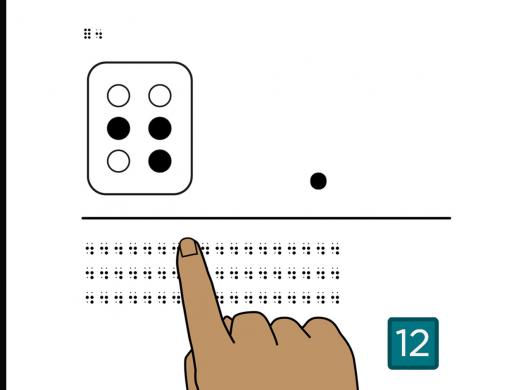
Feel the braille in the top left corner of the page.
This is the full cell followed by an apostrophe.
The apostrophe is dot 3, the bottom dot on the first side.
Below the middle line, you’ll find three rows of apostrophes.
Place your fingers on the apostrophe at the beginning of the first row.
No need to count. Just feel each row of apostrophes from left to right.
Turn the page.
Page 7
Feel the full cell, followed by an apostrophe, in the top left corner of the page.
Below the middle line you’ll find three rows of apostrophes.
Find the apostrophe at the beginning of the first row.
From left to right, count the number of apostrophes in the first row.
There are four apostrophes in the first row.
Now count the number of apostrophes in the second row.
If you counted six, you found them all.
And last, count the number of apostrophes in the third row.
There are two in this row.
Turn the page.
Page 8
Feel the full cell, followed by an apostrophe, and the capital letter indicator, followed by a full cell, in the top left corner of the page.
The apostrophe is the bottom dot on the first side, dot 3. And the capital letter indicator is the bottom dot on the second side, dot 6.
Below the middle line, you’ll find two rows of braille.
Which row contains the full cell followed by the apostrophe?
If you picked the first row, you got it!
Now find the row that has the capital letter indicator followed by the full cell.
It’s the second row.
Turn the page.
Page 9
Feel the braille in the top left corner of the page.
This is the full cell and the apostrophe.
Below the middle line, you’ll find three rows of braille.
Read the two words in the first row.
Which word is, “we’ll,” like in, “We’ll come for a visit.”
If you said the second word, that is correct. It has the apostrophe.
Without the apostrophe, you have the word, “well,” like the first word.
Now find the word, “he’d” in the second row.
Did you find, h-e-apostrophe-d, in the first word?
In the last row, find the word, “she’s,” as in the sentence, “She’s going to town.”
The second word is she-apostrophe-s.
Turn the page.
Page 10
Feel the full cell, the apostrophe, and another full cell in the top left corner of the page.
Let’s practice reading names that use apostrophes.
Below the middle line, you’ll find four names that use an apostrophe.
Go ahead and read the first name.
If you read, Dan-apostrophe-s, for “Dan’s,” you got it!
Now read the second name.
This is Edith-apostrophe-s, or “Edith’s.”
Next, read the third name.
This is capital E-u-l-a-apostrophe-s, for “Eula’s.”
Finally, read the last name.
This is O’Brian,
capital O-apostrophe-capital B-r-i-a-n.
Names with apostrophes in the middle can be confusing.
Just remember to repeat the capital letter indicator after the apostrophe when the next letter is capitalized.
Notice all of these names begin with the capital letter indicator, and also use an apostrophe.
The capital letter indicator is dot 6, the bottom dot on the second side, and the apostrophe is dot 3, the bottom dot on the first side.
If you’d like to learn some tips and tricks to tell these symbols apart, call a braille learning expert.
Turn the page.
Page 11
Feel the braille in the top left corner of this page. This is the apostrophe, numeric indicator, 63.
When an apostrophe comes at the beginning of a number, it usually shows that the century has been left out.
For example, apostrophe-63 could be used to describe a ‘63 Oldsmobile.
Below the middle line, you’ll find three numbers with an apostrophe that stands for the century.
Let’s read the first one.
If you read, “apostrophe, numeric indicator, 21,” you got it. Now read the second one.
This is “‘76.”
And now read the last one.
This one’s a little tricky. It could be used to describe a song from several decades ago. It says, “‘80s.”
Turn the page.
Page 12
Feel the full cell, apostrophe, and another full cell in the top left corner of this page.
Below the middle line, you’ll find four sentences with words using the apostrophe.
Go ahead and read the first sentence.
This sentence says, “He’s fun!”
Now, read the second sentence.
This one says, “Does Cordelia’s sister live here?”
Next, read that third sentence.
If you read, “I don’t miss the rainy weather!” you got it!
Finally, read the last sentence.
The last sentence says, “This campus was built in the ‘50s.”
Turn the page.
Page 13
Feel the braille in the top left corner of the page.
This is dot 6, dot 6 again, and the full cell.
As you’ve already learned, when a single dot 6 is used right before a letter, it capitalizes the letter that follows.
Now let’s look at what happens when you use the dot 6 twice in a row right before a word.
This is the capital word indicator, and it means the entire word is capitalized.
Below the middle line, you’ll find three rows of capital word indicators.
Place your fingers at the beginning of the first row.
No need to count. Simply feel each row of capital word indicators from left to right.
Turn the page.
Page 14
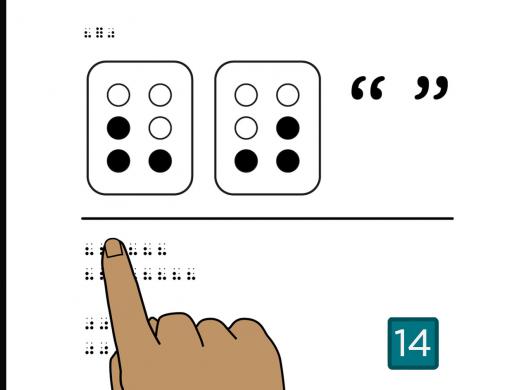
Feel the capital word indicator, dot 6, dot 6, followed by a full cell in the top left corner of this page.
The capital word indicator is a two-cell symbol.
It’s the bottom dot on the second side, then another bottom dot on the second side.
Below the middle line you’ll find three rows of capital word indicators.
Find the capital word indicator at the beginning of the first row.
From left to right, count the number of capital word indicators in the first row.
There are four in the first row.
Now, count the number of capital word indicators in the second row.
If you counted five, that’s right!
And last, count the number of capital word indicators in the third row.
There are two in this row.
Turn the page.
Page 15
Feel the capital word indicator followed by a full cell in the top left corner of this page.
Let’s practice finding words with all capital letters.
Below the middle line, you’ll find four words.
Find the word, “NICE,” with all the letters capitalized.
If you picked the first word, that’s it.
Now, find the word, “Nice” with only the first letter capitalized.
That’s the third word.
Next, find the word, “NO,” with all capital letters.
If you picked the last word, you got it!
Finally, find the word, “No,” with just the first letter capitalized.
It’s the second word.
Turn the page.
Page 16
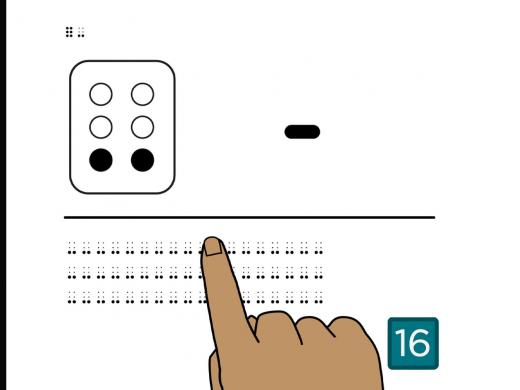
Feel the braille in the top left corner of the page.
This is the capital word indicator and a full cell.
Below the middle line, you’ll find three sentences with song titles.
People often write song titles in all capital letters.
In the first row of braille, what song does Charmaine love?
If you said, “HEY JUDE!” you’re right!
Now, read the sentence in the second row.
This one says, “Gabby plays UNFORGETTABLE.”
Finally read the braille in the last row to find the name of an artist and her song.
The last row says, “Patsy Cline’s song, CRAZY.”
Turn the page.
Page 17
Feel the braille in the top left corner of the page.
This is the capital word indicator and a full cell.
You’ve learned that using two capital indicators in a row puts the whole word into capital word mode.
That means the following letters are all capitalized.
A space after a word ends capital word mode.
So does punctuation and any symbol that is not a letter.
Let’s look at an example of a word where capital word mode ends before the word ends.
Below the middle line you’ll find one braille example.
This is the name, “RICKY’S,” using an apostrophe and all capitals.
Let’s check out each symbol in this name.
First, we have the capital word indicator, dot 6,
dot 6, followed by the letters, R-I-C-K-Y, then the apostrophe, dot 3.
Here’s where it gets a bit tricky.
The capital word indicator ends with any non-letter symbol, space, or punctuation.
So, this word needs a capital letter indicator, dot 6, right before the letter S.
In this example, all the letters are capitalized, including the S after the apostrophe.
Turn the page.
Page 18
Feel the comma, apostrophe, and capital word indicator in the top left corner of the page.
Now that you’ve learned these three braille symbols, let’s practice finding each one.
Below the middle line, you’ll find three rows of braille.
Which row has full cells followed by a comma?
It’s the last row.
Go ahead and count the number of full cells with commas in this row.
There are five.
Next, find which row has the capital word indicator followed by a full cell.
If you picked the second row, you found it.
Now count the number of capital word indicators followed by the full cell.
There are three.
And last, find the row with the full cell followed by an apostrophe.
It’s the first row.
Count the number of full cells followed by an apostrophe in this row.
There are four.
Turn the page.
Page 19
Feel the comma, apostrophe, and capital word indicator in the top left corner of the page.
Below the middle line, you’ll find four rows of braille.
Find the row that reads, “My CAT,” with the word cat in all capital letters.
If you picked the second row, that’s it.
Now find the row that says, “My cat,”.
My cat, is in the first row.
Next, find the row that says, “My Cat,” with only the first letters of each word capitalized.
This is in the third row.
And finally, find, “My CAT’S” with the word cat, apostrophe, S in all capital letters.
This is in the last row.
Notice that the apostrophe ends capital word mode.
So another capital letter indicator needs to be added to make a capital letter S.
These words can be tricky, but with a little practice, you’ll the hang of it.
You can replay this page at the end to try this activity again.
And sometimes it helps to write new symbols.
If you want to practice writing words with symbols, or any other braille words, contact a braille expert at Hadley, and they can help you get started.
Turn the page.
Page 20
Feel the comma, apostrophe, and capital word indicator in the top left corner of the page.
Below the middle line, you’ll find a numbered list for planning a family trip.
Which phrase tells you to take a train to a certain city?
Here’s a hint. It includes the abbreviation for California.
This is in the first row.
Did you get the name of the city? It’s “Oakland.”
Which phrase names a hotel?
Yes, it’s in the third row.
And what’s the name of the hotel?
If you read, “EDISON,” in all capital letters, you’re right!
Now read the braille in the second row to find out whose mom needs a flight.
“Ed’s mom” needs a flight.
Turn the page.
Page 21
Feel the comma, apostrophe, and capital word indicator in the top left corner of the page.
Below the middle line is a food order someone has written down for their co-workers.
Go ahead and read the four rows of braille for this food order.
What is the name of the cafe?
It’s the “ROARING ‘20s CAFE.” ROARING and CAFE are in all capital letters.
One person doesn’t want anything. Who is it?
If you said, “Carlos,” you’re right!
“DOESN’T” is in all caps.
Notice that using an apostrophe ends the capital word indicator.
What does E.J. Haines want?
He wants, “beans, no cheese.”
And what is O’Neil’s order?
“burger, soda, fries.”
Being able to write food orders comes in handy.
If you’d like to learn how to write food orders and other notes in braille, give us a call. We are here to help.
Turn the page.
Page 22
Now that you know, capitals and punctuation you can start reading books in uncontracted braille.
Contact a braille expert if you’d like a bookmark and to find out how to get books in uncontracted braille.
Select Next to complete this workshop.
Completion
Congratulations! You’ve learned to capitalize words and use basic punctuation.
Braille for Everyday Use: Punctuation Series
- Workshop
- Workshop
Explore
-
An Easier Way to Shop Online With Vision Loss: InnoSearch AI
Audio · 21 minutes
-
I'm feeling overwhelmed
Resource guide
-
Organizing Your Kitchen with Vision Loss: What’s in the Pantry?
Article · 4 minutes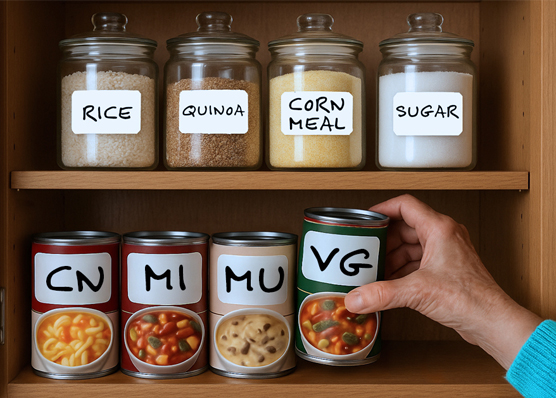
-
Book Nook
Discussion
- Explore more
Members also liked
- Workshop

- Workshop
- Workshop

- Video · 6 minutes
Join the Hadley Community
Hadley's resources are always available to you. Create a no-cost Hadley account to go further:
-
Pick up where you left off Everything you start is automatically saved across Hadley.
-
Personalized recommendations We'll suggest resources based on your interests.
-
Join live discussions Live and lively discussions on technology, cooking, and more, all geared toward the community of people living with vision loss.
-
Find peer support Connect with people who understand what you're going through.